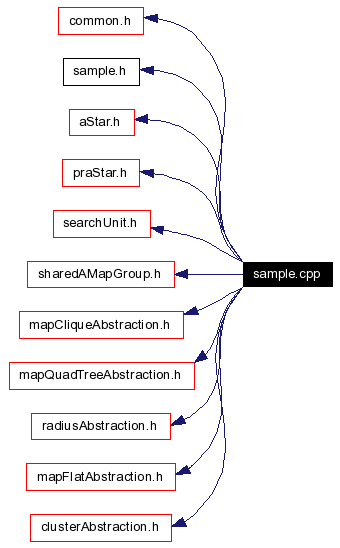
#include "common.h"#include "sample.h"#include "aStar.h"#include "praStar.h"#include "searchUnit.h"#include "sharedAMapGroup.h"#include "mapCliqueAbstraction.h"#include "mapQuadTreeAbstraction.h"#include "radiusAbstraction.h"#include "mapFlatAbstraction.h"#include "clusterAbstraction.h"Include dependency graph for sample.cpp:
Functions | |
| void | processStats (statCollection *) |
| This function is called each time a unitSimulation is deallocated to allow any necessary stat processing beforehand. | |
| void | createSimulation (unitSimulation *&unitSim) |
| This function is used to allocate the unit simulated that you want to run. | |
| void | frameCallback (unitSimulation *us) |
| This function is called once after each [time-step and frame draw] You can do any high level processing, drawing, etc in this function. | |
| void | initializeHandlers () |
| Allows you to install any keyboard handlers needed for program interaction. | |
| int | myCLHandler (char *argument[], int maxNumArgs) |
| void | myDisplayHandler (unitSimulation *unitSim, tKeyboardModifier mod, char key) |
| Key handler for simulation and display related stuff. | |
| void | myRandomUnitKeyHandler (unitSimulation *unitSim, tKeyboardModifier mod, char) |
| void | myPathfindingKeyHandler (unitSimulation *unitSim, tKeyboardModifier mod, char) |
| Key handler for Nathan's algorithms. | |
| bool | myClickHandler (unitSimulation *unitSim, int, int, point3d loc, tButtonType button, tMouseEventType mType) |
Variables | |
| bool | mouseTracking |
| int | px1 |
| int | py1 |
| int | px2 |
| int | py2 |
| int | absType = 3 |
|
|
This function is used to allocate the unit simulated that you want to run. Any parameters or other experimental setup can be done at this time. |
|
|
This function is called once after each [time-step and frame draw] You can do any high level processing, drawing, etc in this function.
|
|
|
Allows you to install any keyboard handlers needed for program interaction.
|
|
||||||||||||
|
|
|
||||||||||||||||||||||||||||
|
|
|
||||||||||||||||
|
Key handler for simulation and display related stuff.
|
|
||||||||||||||||
|
Key handler for Nathan's algorithms.
|
|
||||||||||||||||
|
|
|
|
This function is called each time a unitSimulation is deallocated to allow any necessary stat processing beforehand.
|
|
|
|
|
|
|
|
|
|
|
|
|
|
|
|
|
|
|
 1.3.4
1.3.4