Data Warehousing à la Microsoft
Dave Gomboc, Jun Luo,
Vijayan Menon
With the release of SQL
Server 7.0, Microsoft has seized a prominent seat for itself at the OLAP vendor
round table. We provide an overview of
Microsoft’s integrated data warehousing solution.
Table of Contents
1. Introduction2. Data Transformation Services
3. SQL Server OLAP Services
3.1 System Architecture3.2 Data Cubes
3.3 Decision Support Objects
3.4 Multidimensional Expressions
3.5 PivotTable Service
4. English Query
5. Acknowledgements
6. References
1.
Introduction
Data warehousing has become an important part of the
business decision making process.
Oracle and IBM have provided the Fortune 1000 with decision support
systems, but Microsoft’s SQL Server 7.0 provides organizations of more modest
stature an opportunity to transform operational data into a powerful decision
support mechanism for organizations.
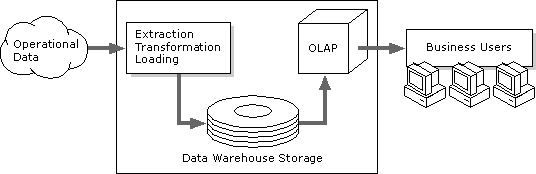
Microsoft provides several components to provide an
end-to-end solution for data warehousing in SQL Server. Data Transformation Services (DTS) assists
in the process of data cleaning.
Microsoft’s OLAP Server benefits from the traditional strengths of SQL
Server: wizards to guide a user through the steps required to perform common
tasks, automated performance tuning based upon prior usage, and object models
that encapsulate procedural code into classes that are easy to understand and
use in third-party applications.
Multidimensional Expressions (MDX) provides an application programming
interface (API) for data cube querying and manipulation. PivotTable Service allows the computational
load to be split between the client and the server. Microsoft also includes PivotTable, a COM component for
displaying decision support information.
PivotTable is also included in Excel 2000 and Internet Explorer 5, the
latter making it possible to quickly develop applications that query a data
cube over a network such as the Internet.
2. Data
Transformation Services
Transaction data collected by businesses is archived
in a variety of places and formats.
Successful warehousing begins with data consolidation and cleaning. Microsoft provides Data Transformation
Services (DTS) to assist with this process.
DTS allows the import from and export to any data source supported by
OLE DB, Microsoft’s major database application programming interface. OLE DB interfaces exist for SQL Server,
Oracle, and ODBC data sources.
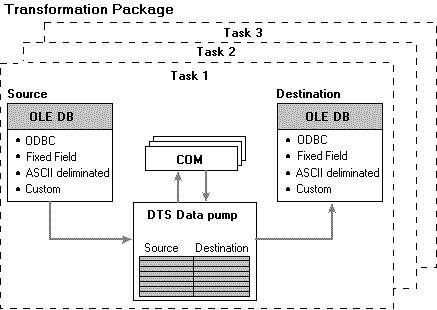
To use DTS, you define a transformation package
contains multiple tasks; each task contains multiple steps. The workflow can be sequenced in any
order. Step precedence may be
represented by a finite state machine whose edges represent the actions
“complete”, “succeed”, and “fail”. Not
all steps need be actual data processing operations: sending email is also
possible!
Transformations that DTS can perform include:
·
Data
Cleaning
·
Interpolate
missing values
·
Smooth
noisy data
·
Detect
inconsistent data
·
Change
how items are represented
·
Data
Integration
·
Support
schema integration
·
Detect
inconsistencies, and resolve them in a user-specified manner
·
Data
Transformation
·
Normalize
data
·
Aggregate
data (for when we do not wish to carry the low-level details in the cube)
·
Generalize
A data warehouse must be kept current over
time. DTS allows the user to
interactively refresh its contents with the latest information, or schedule
periodic updates to occur automatically.
3. SQL Server OLAP Services
3.1 System Architecture
SQL Server 7.0 OLAP Services includes a hybrid OLAP
server, combining the superior scalability of relational OLAP and the faster
query response time of multidimensional OLAP.
Microsoft’s implementation of OLAP Services is structured to reduce the
cost of creating and maintaining OLAP applications. Each component communicates with the others through well-defined
interfaces, so any independent software vendor can implement OLAP solutions
while relying on Microsoft to handle the back-end work.
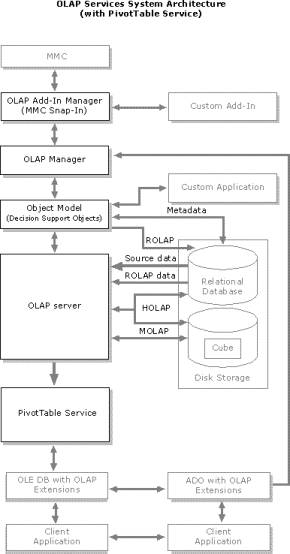
Basic OLAP Server functionality is accessible to end
users via OLAP Manager. This graphical
interface facilitates the population of OLAP data stores, and the design of
OLAP data models. The OLAP server
constructs and queries multidimensional cubes, and caches data, user queries,
and metadata. PivotTable Service
provides client access to cube information.
Administrative functions in the analysis server may be accessed
programmatically through Microsoft’s Decision Support Objects (DSO).
OLE DB is the transport protocol by which OLAP
Services components communicate. Any
OLE DB data provider may participate.
ODBC may be layered into OLE DB, allowing Oracle, Sybase, Informix, and
DB2 data repositories to be accessed.
Microsoft’s OLAP Server supports MOLAP, ROLAP, and
HOLAP, but that’s just the beginning.
Users of SQL Server Enterprise Edition can partition cubes into separate
segments and choose for themselves the degree to which each cube partition will
be materialized. A sophisticated
algorithm to select appropriate data for materialization has been implemented. Virtual cubes may be constructed by
combining several actual cubes. This is
akin to the idea of a view in a relational database. Cube data may also be configured as writable; written cells are
stored separately, rather than overwriting original cell values.
We will discuss the cube structure, Decision Support
Objects, and the PivotTable Service in more detail later in this document.
3.2 Data Cubes
Fundamental attributes of a cube include its data source, its dimensions, and measures along those dimensions. Fact and dimension tables are accessed via the data source link. Dimensions map information into a hierarchy of levels. For example, a time dimension may be comprised of the levels year, quarter, and month. Multiple hierarchies for a dimension may co-exist. Dimensions can be private to a particular cube, or created for use in many different cubes. It is possible to use a subset of a dimension to define a virtual dimension. Virtual dimensions are not materialized: only the defining formula is stored.
Typically, the raw data that will end up as part of
the cube is organized into a fact table at the centre of a star or snowflake
schema. In the former case, dimension
tables link directly to the fact table.
In the latter case, dimension tables may be joined to the fact table via
other dimension tables. Dimensional
data is subject to change, e.g. a customer moves to a new address. Using a snowflake schema makes changes
easier, but using a star schema can speed the cube materialization process by
minimizing table joins.
The fact table contains data that describes specific
events or data aggregations. It is
often updated with new data, but older data is changed only under unusual
circumstances (e.g. product or territory realignments.) It is vital that the structure of the fact
table is correct before cube processing begins, because materializing a cube is
a time-consuming process, and one does not want to have to do it twice!
Measures identify numerical values from the fact
table. Common measures are costs,
profits, and amounts. Cubes may be
partitioned; each partition has its own data source, and can be updated
independently of other partitions. Fact
constellations are supported via virtual cubes: first one must construct cubes
based upon individual fact tables, then one can create virtual cubes that combine
the cubes along user-specified dimensions.
3.3 Decision Support Objects
Microsoft understands that providing APIs that
third-party application developers can exploit is more powerful than simply
providing an end-user application.
Decision Support Objects (DSO) expose the object model of the OLAP
server. DSO allows the direct
manipulation of databases, cubes, partitions, and aggregations.
Commonly, applications using DSO will perform the
following steps. We provide sample
Visual Basic code to accompany each step, to demonstrate how simple it is to
use DSO to perform OLAP operations.
·
Establish
a connection with an OLAP server.
Public
dsoServer as DSO.Server
Public dsoDB
as DSO.MDStore
Public
dsoCube as DSO.MDStore
Set dsoServer
= New DSO.Server
dsoServer.Connect
(“LocalHost”)
·
Create
a database object to store cubes and dimensions.
Dim strDBName
as String
Dim strDBDesc
as String
strDBName =
InputBox (“Enter a Unique DB Name”, “Adding New Database”)
strDBDesc =
InputBox (“Enter a Description”, “Adding New Database”)
Set dsoDB =
dsoServer.MDStores.AddNew (strDBName)
dsoDB.Description
= strDBDesc
dsoDB.Update
·
Add
a data source that contains transaction data.
Dim dsoDS as
DSO.DataSource
Dim
strConnect as String
Const
strConnect = “Provider=MSDASQL.1;Persist Security Info=False;Data
Source=FoodMart;Connect Timeout=15”
dsoDS.Name =
“FoodMart”
dsoDS.ConnectionString
= strConnect
dsoDS.Update
·
Create
dimensions and their levels.
Dim dsoDim as
DSO.Dimension
Dim dsoLev as
DSO.Level
Set dsoDim =
dso.DB.Dimensions.AddNew (“Products”)
Set
dsoDim.DataSource = dsoDS
dsoDim.FromClause
= “product”
dsoDim.JoinClause
= “”
Set dsoLev =
dsoDim.Levels.AddNew (“Brand Name”)
dsoLev.MemberKeyColumn
= “[product].[brand name]”
dsoLev.ColumnSize
= 255
dsoLev.ColumnType
= adWChar
dsoLev.EstimatedSize
= 1
Set dsoLev =
dso.Dim.Levels.AddNew (“Product Name”)
dsoLev.MemberKeyColumn
= “[product].[product_name]”
dsoLev.ColumnSize
= 255
dsoLev.ColumnType
= adWChar
dsoLev.EstimatedSize
= 1
dsoDim.Update
Similar code can be used to define a Store dimension with the levels Store Type, Store ID, and Store Name, and a Time dimension with the levels Year, Quarter, Month, and Week.
·
Create
a cube, specifying the dimensions and measures to be used.
Dim dsoCube
as DSO.Cube
Set dsoCube =
dso.DB.MDStores.AddNew(strCubeName)
dsoCube.DataSources.AddNew
(dsoDS.Name)
dsoCube.SourceTable
= “[sales_fact_1998]”
dsoCube.EstimatedRows
= 10000
dsoCube.Dimensions.AddNew
(“Products”)
dsoCube.Dimensions.AddNew
(“Store”)
dsoCube.Dimensions.AddNew
(“Time”)
Dim strJoin
as String
strJoin =
“([sales_fact_1998].[product_id]=[product].[product_id]) and
([sales_fact_1998].[store_id]=[store].[store_id]) and
([sales_fact_1998].[time_id]=[time_by_day].[time_id])”
dsoCube.JoinClause
= strJoin
dsoCube.Update
Dim dsoMea as
DSO.Measure
Set dsoMea =
dsoCube.Measures.AddNew (“Product Id”)
dsoMea.SourceColumn
= “[sales_fact_1998].[product_id]”
dsoMea.SourceColumnType
= adSmallInt
dsoMea.AggregateFunction
= aggSum
Set dsoMea =
dsoCube.Measures.AddNew (“Store Sales”)
dsoMea.SourceColumn
= “[sales_fact_1998].[store_sales]”
dsoMea.SourceColumnType
= adSmallInt
dsoMea.AggregateFunction
= aggSum
The measures Store Cost and Unit Sales would be
added in a similar fashion.
·
Process
a cube, which means to load its structure and data.
dsoCube.Process
3.4 Multidimensional Expressions (MDX)
The major strength of online analytical processing over traditional information processing techniques is the multidimensionality of its analysis. The multidimensional view of data is a defining characteristic of OLAP methods. Microsoft created an expressive protocol, MDX, with which cubed data may be queried and manipulated. OLAP Services supports MDX functions in the definitions of calculated members and the full MDX syntax is supported by PivotTable Service.
Traditional SQL statements return two-dimensional
row sets. MDX enables us to receive
many-dimensional results from queries.
As with SQL, the MDX query designer must determine the structure of the
return dataset before creating the query.
Fundamentally, this structure is one of dimensions and measures.
MDX works with measures and dimension levels; these
are collectively known as members. It
is possible to have members whose value is computed at runtime. A calculated member allows the use of
multiple stored members in combination with arithmetic operators and functions.
The definition of the calculated member is stored in the cube, but otherwise
the amount of disk space used remains unchanged. Values are calculated when necessary to answer a query, and
thrown away afterward.
Examples in this section use the FoodMart Sales
Cube, a sample cube that ships with SQL Server. The subset of dimensions and measures actually used in our code
examples is compiled below.
Table 1. Sales Cube Dimensions
|
Dimension name |
Level(s) |
Description |
|
Customers |
Country,
State or Province, City, Name |
Customer
location information. |
|
Product |
Product
Family |
The products that are on sale in the FoodMart stores. |
|
Store |
Store
Country |
The
stores’ location information. |
|
Time
|
Years,
Quarters, Months |
Time
period when the sale was made. |
Table 2. Sales Cube Measures
|
Measure name |
Description |
|
Unit
Sales |
Number
of units sold. |
|
Store
Cost |
Cost
of goods sold. |
|
Store
Sales |
Value
of sales transactions. |
|
Sales
Average |
Store
sales divided by sales count. (calculated measure) |
MDX queries must specify:
·
the
dimensions to be projected along each axis
·
the
amount of drill-down that can be performed on each dimension
·
the
slicer specification
A common MDX query form:
SELECT
axis_specification ON COLUMNS,
axis_specification
ON ROWS
FROM
cube_name
WHERE
slicer_specification
Axes are numbered 0, 1, 2… Aliases exist for the first five axes: COLUMNS, ROWS, PAGES,
SECTIONS, and CHAPTERS. A particular
slice need not be specified. If none is
provided, the default slice specification of the cube is used.
The simplest form of an axis specification or member selection is to select the MEMBERS of the required dimension:
SELECT
Measures.MEMBERS ON COLUMNS
[Store].MEMBERS
ON ROWS
FROM [Sales]
This expression queries the recorded measures for
each store, and provides a summary for each defined summary level. The effect is to display the measures for
the Stores hierarchy. In running this
expression, we use a row member named “All Stores”. The “All” member is the default member for a dimension, and is generated
automatically.
To select a single member of a dimension:
SELECT
Measures.MEMBERS ON COLUMNS,
{[Store].[Store
Province].[AB], [Store].[Store Province].[BC]} ON ROWS
FROM [Sales]
This expression queries the measures for the stores
summarized for the provinces of Alberta and British Columbia. To query the measures for the members making
up both of these provinces, one can use CHILDREN:
SELECT
Measures.MEMBERS ON COLUMNS,
{[Store].[Store
Province].[AB].CHILDREN,
[Store].[Store
Province].[BC].CHILDREN} ON ROWS
FROM [Sales]
When running this expression, the row set could be
expressed by either of the following expressions:
[Store
State].[AB].CHILDREN
[Store].[AB].CHILDREN
Fully qualified member names include both their
dimension and parent member at all levels.
When member names are uniquely identifiable, fully qualified member names
are not required.
Slices are specified with the WHERE clause:
SELECT
{[Store Type].[Store Type].MEMBERS} ON COLUMNS,
{[Store].[Store
Province ].MEMBERS} ON ROWS
FROM [Sales]
WHERE
(Measures.[Sales Average])
Calculated members and named sets make MDX a rich
and powerful query tool. Calculated members allow one to define formulas and
treat the formula as a new member of a specified parent. The syntax is :
WITH MEMBER
parent.name AS 'expression'
Here, parent refers to the parent of the new calculated member name. Similarly, for named sets the syntax is:
WITH SET set_name AS 'expression'
Calculated members are convenient for defining new measures that relate existing measures. We can define calculated members ProfitPercent and Time, and use them to display the percentage profit of individual stores for each quarter and half-year.
WITH MEMBER
Measures.ProfitPercent AS
'(Measures.[Store
Sales] - Measures.[Store Cost]) /
(Measures.[Store Cost])', FORMAT_STRING =
'#.00%'
WITH MEMBER
[Time].[First Half 1999] AS ‘[Time].[1999].[Q1] + [Time].[1999].[Q2]’
MEMBER [Time].[Second Half 1999] AS
‘[Time].[1999].[Q3] + [Time].[1999].[Q4]’
SELECT
{[Time].[First Half 1999],
[Time].[Second Half 1999],
[Time].[1999].CHILDREN} ON COLUMNS,
{[Store].[Store Name].MEMBERS} ON ROWS
FROM [Sales]
WHERE
(Measures.ProfitPercent)
Named sets are defined using similar syntax to that
for calculated members. If we define a named set that contains the first
quarter of each year, we can display store profits for that period:
WITH SET
[Quarter1] AS
‘GENERATE
([Time].[Year].MEMBERS, {[Time].CURRENTMEMBER.FIRSTCHILD})’
SELECT
[Quarter1] ON COLUMNS,
[Store].[Store
Name].MEMBERS ON ROWS
FROM [Sales]
WHERE
(Measures.[Profit])
FIRSTCHILD indicates the use of the first child of
the specified member. LASTCHILD also
exists.
MDX provides functions for time period
analysis. If a seasonal sales business
wanted to see how their sales have changed from the first month in their
seasonal quarter to the first month this quarter. Example:
WITH MEMBER
Measures.[Sales Difference] AS
‘(Measures.[Unit
Sales]) – (Measures.[Unit Sales],
OPENINGPERIOD([Time].[Month],
[Time].CURRENTMEMBER.PARENT))’,
FORMAT_STRING
= ‘###,###.00’
SELECT
{Measures.[Unit Sales], Measures.[Sales Difference]} ON COLUMNS,
{DESCENDANTS([Time].[1999],
[Month])} ON ROWS
FROM
[Sales]
MDX supports COUNT, SUM, MIN, and MAX. Here’s an example using COUNT:
WITH
MEMBER.Measures.[Customer Count] AS
‘COUNT
(CROSSJOIN ({Measures.[Unit Sales]},
[Customers].[Name].MEMBERS),
EXCLUDEEMPTY)’
SELECT
{Measures.[Unit Sales], Measures.[Customer Count]} ON COLUMNS,
[Product].[Product
Category].MEMBERS ON ROWS
FROM [Sales]
Note the (optional) use of EXCLUDEEMPTY, ensuring
that empty cells are not counted. More
advanced functions may be defined in a COM component, and subsequently used in
MDX expressions.
3.5 PivotTable Service
PivotTable Service manages the connection between the OLAP server and client applications. It shares much of the OLAP Server’s code, and provides a multidimensional calculation engine, caching features, and query management directly to clients. This optimizes performance by distributing work between the server and the client, thereby reducing network traffic. The resources that PivotTable Service requires are relatively meagre: 2 MB of disk space, and 500 KB of RAM at run-time. The PivotTable Service makes efficient use of shared metadata between client and server. When a user requests information from the server, both the actual data and the metadata (definitions of the cube structure) are downloaded to the client. PivotTable Service makes use of this information to derive the result locally. PivotTable Service is also the mechanism allowing for disconnected usage. Portions of defined cubes can be saved on a client machine for offline data analysis. This is of great benefit to businesspeople who are away from their office for extended periods. Any local OLE DB-compatible data source may also be queried. PivotTable Service directly supports MDX, and a subset of SQL. It is worthwhile to distinguish between PivotTable Service, which is part of SQL Server OLAP Services, and PivotTable, a graphical COM component provided by Microsoft with Microsoft SQL Server, Microsoft Office 2000, and Microsoft Internet Explorer 5.0. PivotTable is one of many clients that can communicate with PivotTable Service. We do not construe it to be part of SQL Server OLAP Services, and consequently do not describe it further.4. English
Query
Most people who want information from a database are not
actually software developers. Microsoft
English Query allows people to ask questions in English.
The person can type in the question:
How many widgets were sold in Washington last year?
The SQL generated might be:
SELECT
sum(Orders.Quantity) from Orders, Parts
WHERE Orders.State=WA
and Datepart(Orders.Purchase_Date,Year)=1998
and Parts.PartName=widget
and Orders.Part_ID=Parts.Part_ID
There is no need for the user to understand how the
database is organized or understand how to program to use English Query.
Developing applications that use English Query is
straightforward. Of course, software
developers must provide contextual information about the database (entities,
relationships, synonym dictionary entries, etc.) before English Query may be
used. Best results are obtained when
databases are properly normalized. It
may be necessary to construct normalized views for denormalized databases.
An important caveat is that English Query is
designed to work with SQL, not MDX. English Query may be used with a ROLAP
cube.
5.
Acknowledgements
Microsoft provides extensive documentation for SQL
Server 7.0, both in the online help and on their web site. We often felt that we were performing data
mining to extract the interesting information!
The diagrams and sample code in our report were created by Microsoft;
some of them have been altered by the authors for use in this document. The MDX discussion refers to the FoodMart
sales cube in the FoodMart sample database that ships with SQL Server 7.0.
6. References
Microsoft Corporation. SQL Server 7.0 Online Help.
Microsoft Corporation. Web Sites:
·
http://www.microsoft.com
·
http://msdn.microsoft.com
Jaiwei Han and Micheline Kamber. Data Mining: Concepts and Techniques. Pre-print. Morgan Kaufmann, 2000.